
Facial Identity Access provides HKU students and staff with a convenient, contactless and secure way to enter designated University premises. It complements existing access methods such as staff/student ID cards and QR codes generated via the HKU App.
No. Participation in Facial Identity Access is voluntary. You need to register only if you would like to use facial identity as an access method.
HKU students can register through the HKU App or at a physical self-registration terminal.
Staff can only register at a physical self-registration terminal.
To register at a physical registration terminal, please present your valid HKU staff or student card and follow the on-screen instructions to capture your facial image.
Self-registration terminals are available at:
- Chi Wah Learning Commons, 1/F
- Main Library, 2/F
- Dental Library
- Medical Library
Self-registration terminals are available at:
- Chi Wah Learning Commons, 1/F
- Main Library, 2/F
- Dental Library
- Medical Library
Registration completed at a self-registration terminal will become effective within 10 minutes.
No. If you have already registered for Facial Identity Access, you do not need to re-register. Your existing registration can be used at the newly added Facial Identity Access panels.
As of the expansion effective 11 May 2026, Facial Identity Access panels are available at designated entrances/floors of:
- Main Library
- Lui Che Woo Law Library
- Music Library
- Yu Chun Keung Medical Library
- Dental Library
- Chi Wah Learning Commons (selected gates)
More facilities are planned to be added in phases.
Yes. Facial Identity Access complements rather than replaces existing access methods. You can continue to use your staff/student ID card or eligible QR code generated via the HKU App.
Detailed instructions for Facial Identity registration through the HKU App are available here:
https://userguide.hku.hk/hku-facial-identity-registration
And the registration link (HKU Students): https://facialid.hku.hk
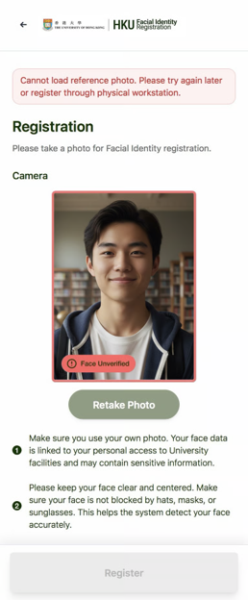
Please take a selfie directly, rather than photographing your HKU card, ID card or an existing photo of yourself.
Ensure your surroundings are well lit so the system can capture your facial features clearly.
If recognition still fails despite adequate lighting, bring your HKU student card to a physical self-registration terminal and register there.
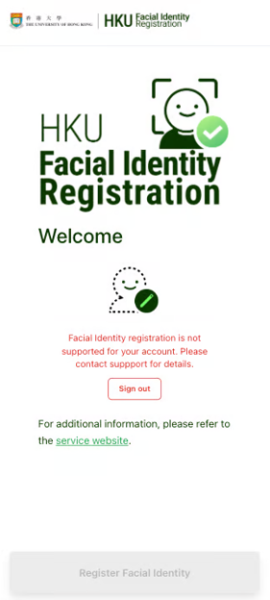
- For full-time staff: Registration through the HKU App is available only to HKU students. Staff must register at a physical self-registration terminal.
- For new HKU students: Your portal account may not be ready yet. You can register at a physical self-registration terminal using your HKU student card. If you have not received your card, wait until your account is ready or your card arrives before registering.
- For part-time staff: Facial Identity Access is currently available to HKU students and full-time staff.
- For facility cardholders: Facial Identity Access is currently available to HKU students and full-time staff. Facility cardholders must use their cards for access.
There may be an issue with your captured facial image. Bring your HKU card to a physical self-registration terminal to register again.
Facial Identity Access is currently available to HKU students and full-time staff. Facility cardholders must use their cards for access.