
Student Writing Assignments in Turnitin Clarity
A Student Writing Assignment of Turnitin Clarity is a transparent writing workspace that provides educators with insights into a student’s drafting process.
Key Features Overview
Student Writing of Turnitin Clarity differs from Standard Assignments by capturing the “how” of writing rather than just the final product.
| FEATURE | DESCRIPTION |
| Revision Timeline | Shows a playback of how the document was composed over time. |
| AI Writing Assistant | An optional, instructor-enabled tool that offers real-time feedback and grammar checks . |
| Integrity Insights | Flags large sections of pasted text and identifies potential AI-generated content . |
| Drafting Space | A dedicated browser-based editor where students must work while online to track changes . |
Creating Student Writing Assignments on Moodle
- In Moodle, switch ON the Edit mode.
- Under a topic, click Add content > Activity or resource.
- Select Turnitin LTI 1.3 for creating a Turnitin assignment.
- Next to Content, click Select content.
- Choose Student Writing to create a Turnitin Clarity assignment.
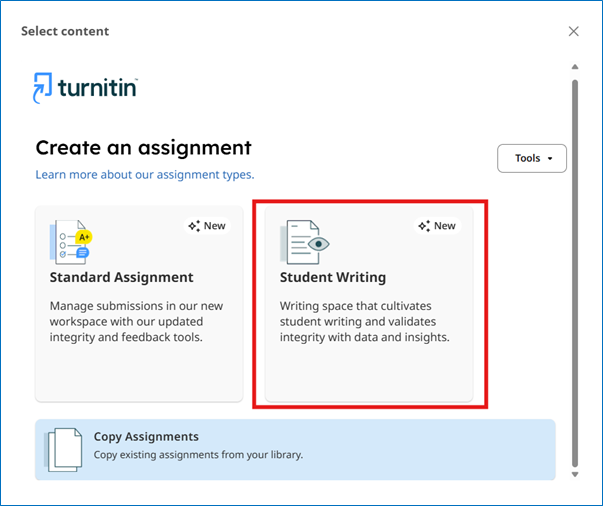
- Accept the Turnitin End-user License Agreement.
- Complete the Assignment Details, Rubrics, Report Settings and select Create Assignment.
- Students can select the Start Writing button to begin.
Official Documentation and Guides from Turnitin
The official user guides below help us navigate the platform’s features, such as the revision timeline and AI writing assistant.
- Instructor Guide: The Introduction to Turnitin Clarity’s Student Writing Assignment explains how to set up assignments and interpret the Writing Report.
- Student Guide (for Teachers’ ease of reference): The Getting Started with Turnitin Clarity for Students covers how to use the online editor, insert images, and access the side panel for instructions.
- AI Tools with Turnitin Clarity: The AI Tools with Turnitin Clarity equips instructors to enable and understand Turnitin Clarity’s AI tools, including AI chat, spelling and grammar check, and citation check.
FAQs for Instructors Using Turnitin Clarity
Turnitin has also categorised FAQs from current users of various institutions. Please have a look at them at the link below: