
Submit a Gradescope Assignment

Gradescope is an assessment platform that enables instructors to create, manage, and grade assignments efficiently, while allowing students to submit work, receive feedback, and monitor their performance. The platform supports both online and paper-based assessments.


Gradescope Assignment Access

Gradescope assignments are provided through an external tool integrated with Moodle. When you select a Gradescope assignment in Moodle, you will be directed to the Gradescope platform (gradescope.com), where you can submit your work and view grades and feedback. All submission activities are completed within Gradescope, while access to the assignment is provided through Moodle.

How to Access a Gradescope Assignment via Moodle

  1. Navigate to the Gradescope assignment in your Moodle course.
  2. You will be directed to the Gradescope platform (gradescope.com).                  
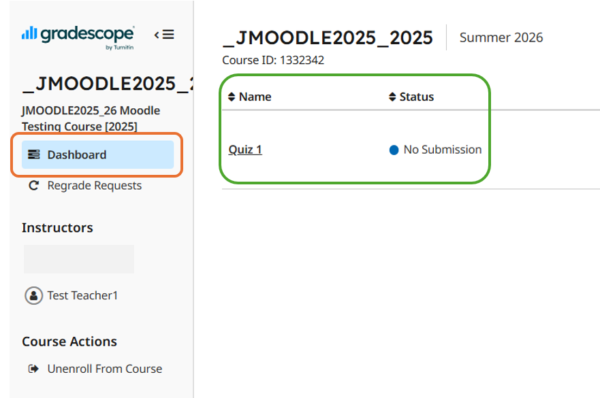
  3. Click Dashboard on the left-hand side to view all assignments in the course.
  4. You can view the details of each assignment in the assignments table.          

How to Submit an assignment in Gradescope

  1. Navigate to the Gradescope assignment in your Moodle course.
  2. You will be directed to the Gradescope platform (gradescope.com).
  3. If your instructor requires file submissions, you can upload your file(s) by selecting Submit Images or Submit PDF on the submission page, as shown below. You may view the video For students: Submit PDFs on the Gradescope website for more details. 
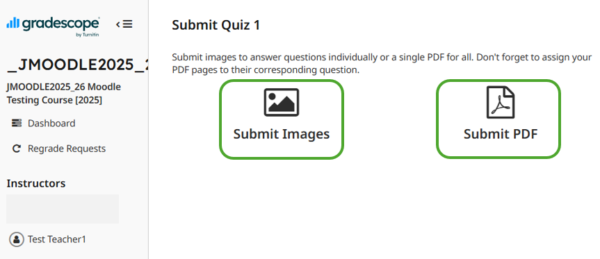
  4. To complete an online assignment in Gradescope, you may refer to the following video:


For detailed guidance on submission, please refer to the following resources:

How to View Feedback and Grades in Gradescope

  1. Navigate to the Gradescope assignment.
  2. You will be directed to the Gradescope platform (gradescope.com).
  3. Once grades have been released, you can view your submission, grades, rubrics, and feedback on the assignment page in Gradescope.
  4. To review published grades, rubrics and feedback, please refer to the following video:
 

For detailed guidance on submission, please refer to the following resources:

Getting Help and Support

If you have any questions regarding the use of Gradescope, you may refer to the following support channels:

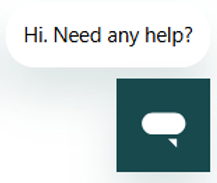
1. Gradescope AI Chatbot

The Gradescope AI Chatbot is available on the Gradescope website and can provide instant assistance for common questions and troubleshooting.

Website: https://guides.gradescope.com/hc/en-us                                                                                                                  
 

2. Gradescope Guides

The Gradescope Guides contains comprehensive user guides and frequently asked questions for instructors and students.

Website: https://guides.gradescope.com/hc/en-us


3. Contact Gradescope Support

For enquiries that cannot be resolved through the AI Chatbot or Gradescope Guides, you may contact the Gradescope Support Team directly.

Email: help@gradescope.com

Note: When contacting Gradescope Support, please provide relevant information such as the course name, course ID, assignment name, screenshots of any error messages, and the steps taken before the issue occurred to facilitate investigation.

OFFICIAL RESOURCES FROM GRADESCOPE (for Students):